





Learn QuickBooks Online in a hands-on step-by-step guided course, with case studies for common daily income and expense workflows, running reports, inventory management, payroll, projects and job costing, and year-end procedures, including best practices.
Stop Guessing Your Way Through QuickBooks Online
Build real company files. Learn the full workflow. Get live expert guidance from Alicia Katz Pollock.
In 12 weeks, build real QBO company files from setup to year-end with live guidance from Alicia Katz Pollock. Learn the full QuickBooks Online workflow, ask questions as you go, and walk away with practical knowledge and the confidence to use it.
If you’ve been trying to learn QuickBooks Online from scattered YouTube videos, help articles, and trial and error, you already know the problem.
You can pick up tips here and there, but that doesn’t always help you understand the full workflow. You may know how to click a button, but not always why you’re clicking it, when to use it, or how it affects the books later.
That’s where this course is different.
QuickBooks Online Complete Hands-On Training is based on Alicia Katz Pollock’s book, QuickBooks Online Complete, and turns it into a live, guided, hands-on learning experience. Instead of reading about QuickBooks or watching someone else use it, you’ll work through the process yourself with Alicia showing you what to do, explaining why it matters, and answering questions along the way.
.png?lmsauth=4edcf86e2f4b24496e639af8433952cabf4fa9a2)
Alicia was named Insightful Accountant’s 2026 Top ProAdvisor Educator, and she has built her career around making QuickBooks Online easier to understand for bookkeepers, accounting professionals, and business owners. In this course, you’re not learning from random internet advice. You’re learning from someone who knows both the software AND how to teach it clearly.
You’ll watch Alicia demonstrate each workflow, then you’ll do it yourself inside your own QBO Plus file with Payroll. You’ll work through real-world bookkeeping scenarios, practice common income and expense workflows, run reports, manage inventory, explore payroll, handle projects and job costing, and complete year-end procedures.
And you won’t be doing it alone.
This is a live, guided course, so you can ask questions as you go. If you miss a session, you’ll have access to the recordings, and you can still get help with your questions afterward.
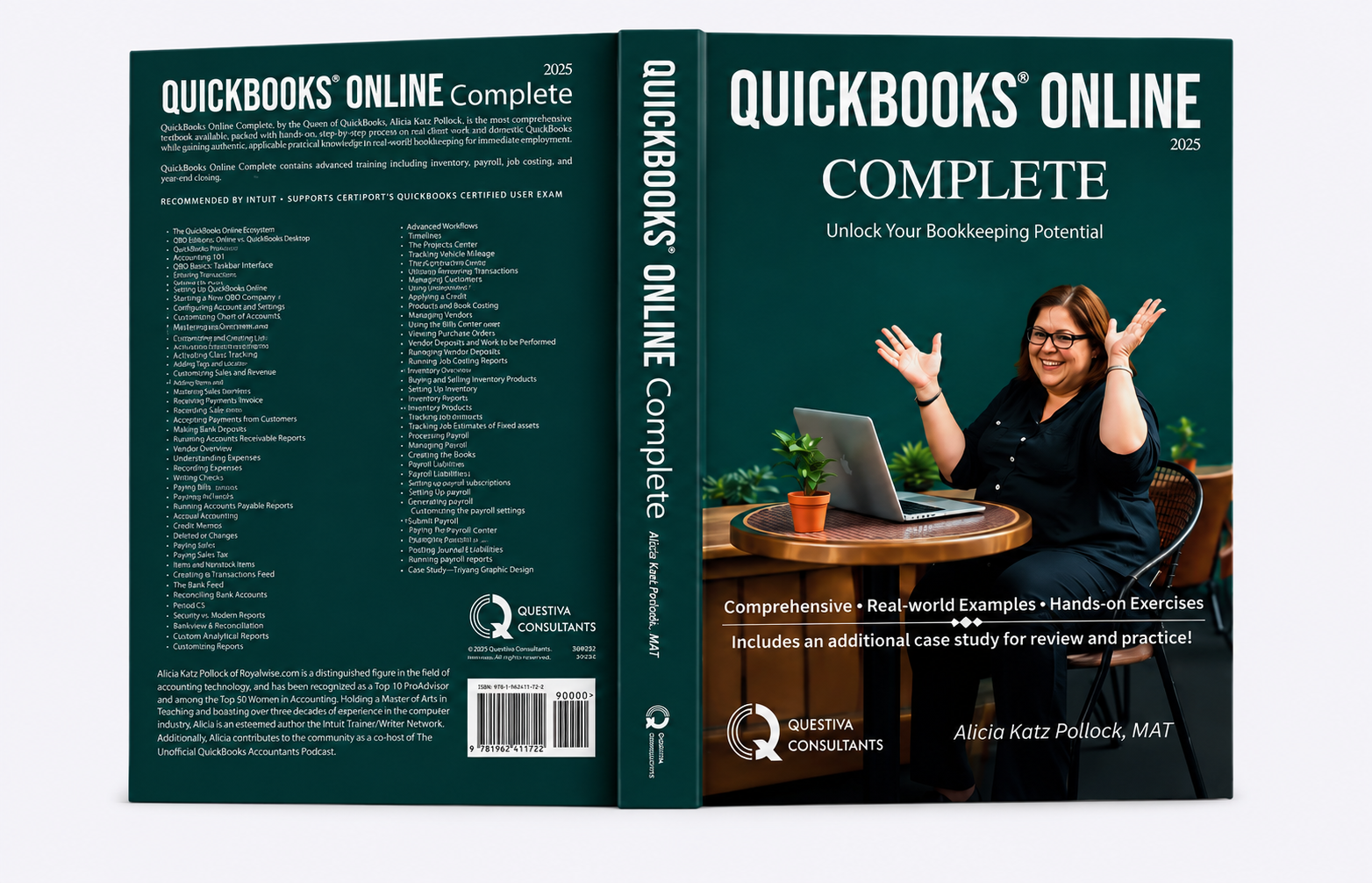
When you enroll, we’ll send you Alicia’s QuickBooks Online Complete textbook. On the first day of class, you’ll be invited into your own QuickBooks Online Plus file with Payroll. Over the next 12 weeks, you’ll build clean, organized QBO company files while learning how the pieces fit together.
By the end of the course, you won’t just have watched someone use QuickBooks. You’ll have practiced the workflows yourself, built real company files, earned 72 CPE credits, and gained the confidence to work in QuickBooks Online without constantly second-guessing your next step.
If you’re ready to stop piecing QuickBooks together one random tutorial at a time, this is your path.
Register now and learn QuickBooks Online the way it finally starts to click: by doing the work, with an expert guiding you through it.
A Serious Course for Serious QuickBooks Skills
QuickBooks Online is not something most people master by watching a few disconnected videos.
You can learn a shortcut here, a feature there, and maybe solve one problem at a time. But when your books, your clients’ books, your payroll, your reports, and your year-end work are on the line, guessing gets expensive.
This course is a serious investment of both time and money, and it is designed that way on purpose.
Over 12 weeks, you’ll receive 72 hours of live guided training, hands-on practice, a real QuickBooks Online Plus file with Payroll, Alicia’s QuickBooks Online Complete textbook, class recordings, CPE credit, and a structured path from setup to year-end.
At the current $1,999 rate, that comes out to about $27 per hour of live training before you even factor in the textbook, practice files, recordings, CPE credits, and support. More importantly, you’re investing in the kind of practical knowledge that can save you months of confusion and help you do the work more professionally.
You are not paying for a pile of videos.
You are paying for guided practice, expert feedback, real company files, and a complete learning experience built around actually using QuickBooks Online.
What Last Year's Learners Had To Say
Students consistently point to the same things: Alicia’s patience, the hands-on practice, the clear explanations, and the confidence that comes from actually doing the work.
Who This Course Is For
This course is designed primarily for bookkeepers, aspiring bookkeepers, and accounting professionals who want to build real competence in QuickBooks Online.
Whether you’re starting a bookkeeping career, expanding your services, preparing to take on more clients, or tired of second-guessing your QBO workflow, this hands-on training gives you the structure, practice, and expert guidance to do the work more confidently.
Small business owners are welcome too, especially if you want a deeper understanding of your books and the systems behind them. Just know that this is a comprehensive, professional-level course, so it goes beyond the basics most business owners need for day-to-day bookkeeping.
Learn QuickBooks by Building Real Company Files
This course is built like a 12-week college class, but designed for real-world QuickBooks Online users who want the software to finally make sense.
Alicia will guide you step by step through the full QuickBooks Online workflow, from setup to year-end. You’ll start with the foundation, including your chart of accounts and company settings. Then you’ll move into the daily bookkeeping work, including sales, expenses, banking, customers, vendors, inventory, payroll, projects, reports, and reconciliations.
But this is not just a “watch me click around QuickBooks” class.
You’ll see each workflow demonstrated, then you’ll practice it yourself. That matters because QuickBooks is easier to understand when you can connect the buttons to the bookkeeping behind them. You’ll learn not just what to click, but why it matters, when to use it, and how each step affects the company file.
You’ll practice in three ways:
First, you’ll learn with Craig’s Design and Landscaping.
Alicia will use Intuit’s sample company, Craig’s Design and Landscaping, to demonstrate each procedure click by click. Because the sample company resets, you can return to it and practice the same workflows as many times as you need.
Next, you’ll build Imagine Photography from scratch.
At the end of each chapter in QuickBooks Online Complete, you’ll complete a hands-on “Do It Yourself” exercise. You’ll receive a free one-year educational subscription to your own QuickBooks Online file, where you’ll build the books for Imagine Photography, a retail and service company that sells camera equipment and also does photo shoots. As the chapters build, your company file builds too, giving you practical experience with the way bookkeeping activity unfolds over time.
Then, if you’re ready for an extra challenge, you can work through YinYang Graphic Design.
More experienced learners can reinforce their skills with an optional second case study. Instead of walking you through every click, this challenge tells you what the company file needs next and gives you the opportunity to create the transactions from memory, referring back to the chapter as needed.
You’ll also receive a paperback copy of QuickBooks Online Complete, the college textbook written by Alicia Katz Pollock and published by Questiva Consultants. The class follows the structure of the book, turning the lessons into a live, guided experience where you can ask questions, practice the workflows, and build confidence as you go.
By the end of the course, you won’t just have watched QuickBooks being used. You’ll have built complete company files, practiced real bookkeeping scenarios, and gained a stronger understanding of how QuickBooks Online works from the inside out.
After completing this course, you will be able to:
- Set up a new QuickBooks file
- Create sales transactions to receive money from your customers
- Create expense transactions to pay your vendors
- Use the Bank Transactions Center and reconcile your bank statements
- Run reports analyzing your company’s performance
- Manage inventory stock levels
- Set up employees and run payroll
- Use Projects and job costing features to analyze profitability
- Close out the year including equity adjustments
How To Take This Course
We will cover each chapter of the book over four hours. During the first two hours, Alicia will run through the chapter lesson, demonstrating the techniques using Craig’s Landscaping, while students follow in their book. In the third and fourth hours, Alicia will demonstrate the end-of-chapter exercise while students follow along in a live lab environment where they can ask questions and get help.
If the work is not completed by the end of class, students are strongly encouraged to finish it between classes so that they’re ready for the next chapter. While the homework is not “required,” the Imagine Photography scenario builds chapter by chapter. It must be completed (and any mistakes corrected) before you can add the content from the following chapter.
This agenda requires a time commitment from attendees. It’s important to attend each session to learn QBO’s features and workflows. If you are unable to keep pace with the end-of-chapter exercise, that’s fine; you can just keep going at your own pace and we’ll help you as much as we can!
We understand that work, life, and the holidays also require your full attention. Each live session will be recorded so you can go back and review the content, or catch up on classes you missed
.png?lmsauth=c8031b4236ee402414b9c4209bfa1f852cef3421)
Watch a Sample from QBO Hands-On Training 2025
Watch a sample lesson from last year's QBO Complete Hands-On Training and see how Alicia walks through managing a vehicle or equipment loan in QBO, including the setup, journal entry, and recurring payments.
Certification Prep
This course is mapped to Certiport’s QuickBooks Online Certified User (QBOCU) exam, a valuable industry credential that validates your QuickBooks Online expertise. Boost your career prospects and earning potential by demonstrating your proficiency to employers and clients.
Participation will also prepare you for the majority of Intuit’s QuickBooks ProAdvisor Certification, though we do not cover the QBOA Accountants tools that are on that exam.
Frequently Asked Questions
Get clear answers about the course format, time commitment, cost, certification prep, and whether this training is the right fit for you.
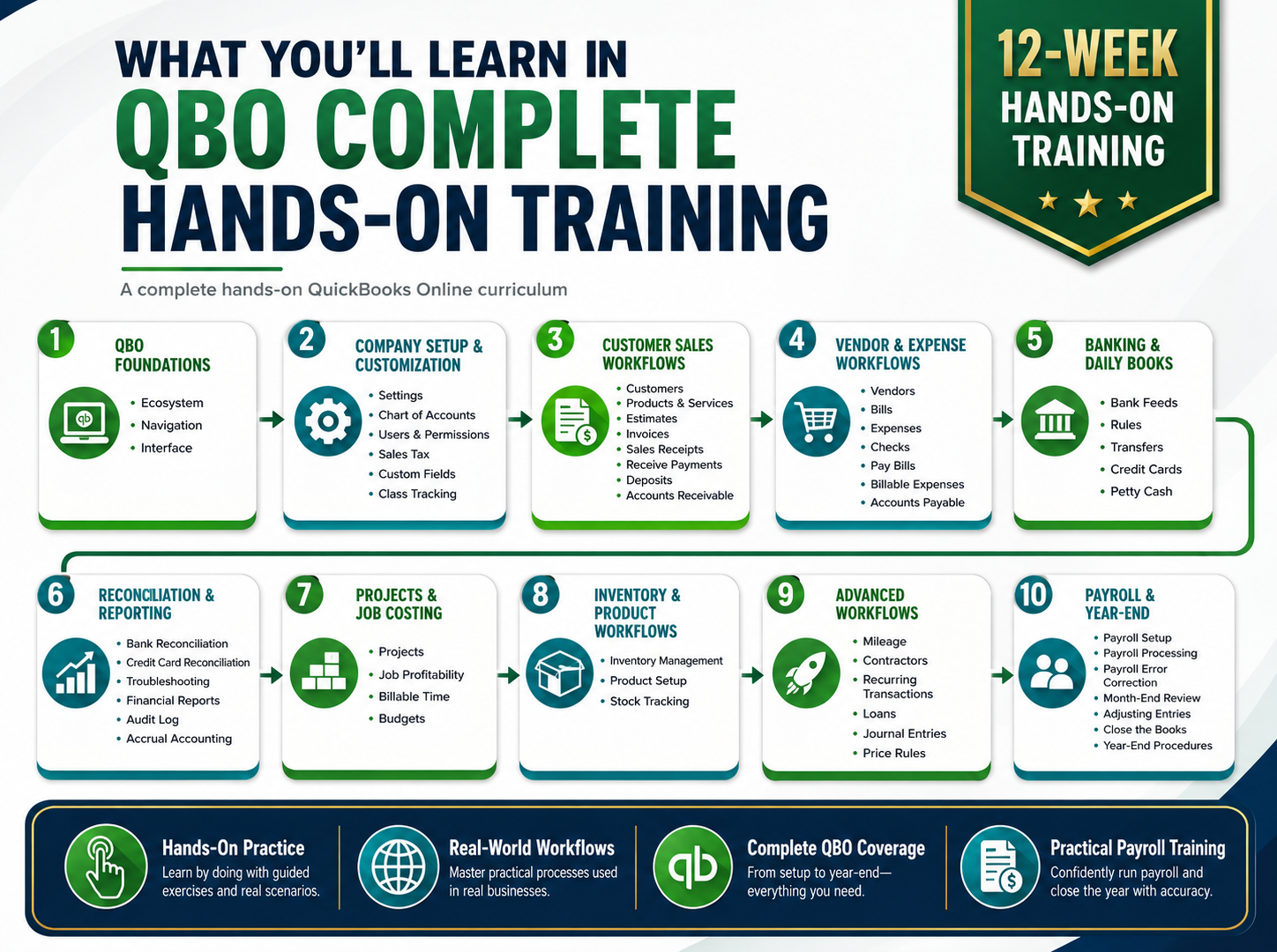
What You’ll Learn
Explore the full QuickBooks Online workflow, from setup and daily bookkeeping to reports, payroll, inventory, projects, and year-end procedures.
Sponsored by Universal Accounting & Alignable

Build your QuickBooks skills, grow your confidence, and take the next step in your accounting career.
We’re proud to have Universal Accounting sponsoring QBO Hands-On Training 2026. Since 1979, Universal Accounting has helped accounting, bookkeeping, and tax professionals gain the training, certifications, coaching, and support they need to build confidence, expand their skills, and get paid what they’re worth. If you’re learning QuickBooks Online to grow your career, strengthen your client services, or prepare for your next professional step, Universal Accounting offers additional resources to help you keep moving forward.
Learn more about Universal Accounting
Build your network, grow your referrals, and connect with business owners who understand what you do.
We’re proud to have Alignable sponsoring QBO Hands-On Training 2026. Alignable is a small business networking platform built to help business owners, bookkeepers, accountants, and service providers make meaningful connections, earn referrals, and grow through trusted local relationships.
Learn more about Alignable
Instructional LevelBasic
Course Length72 hours
Course Credits72 CPE credits, Royalwise Certification
Field of StudyComputer Software & Applications
Delivery MethodGroup Internet Based
Prerequisites
What Do You Need to Participate?
Who should take this class?
|
Refunds & Cancellations
Please view our Terms of Service, for information on refunds, cancellations, and complaint resolution. To request a refund, please contact us.
Royalwise Solutions Inc. is registered with the National Association of State Boards of Accountancy (NASBA) as a sponsor of continuing professional education on the National Registry of CPE Sponsors. State boards of accountancy have final authority on the acceptance of individual courses for CPE credit. Complaints regarding registered sponsors may be submitted to the National Registry of CPE Sponsors through its website: www.nasbaregistry.org.
To earn CPE credit, attend each class or watch the recording, take the optional quizzes, and complete the homework. CPE must be earned within one year of enrolling in the course.
Course Credits: 72 CPE for QBO HOT Complete, Royalwise Certification. Must be awarded within one year of enrollment
Course Page Updated: July 2026
^ Back to Top ^
Here is the course outline:
How to Join the Live Class ZoomClick the link below for instructions on how to join the live zoom 1 section
|
|
|
REQUIRED Course Materials: Required for CPE and required to participate.REQUIRED: You must complete the order form to receive your QBO Complete book before class. 9 sections
|
|||||||||
|
Chapter 1: The QuickBooks Online Ecosystem
Aug 4
The QuickBooks Online Ecosystem , QuickBooks Online vs. QuickBooks Desktop, Third-party Apps, QuickBooks Online Versions QuickBooks Online for Accountants, Accounting 101, Using a Browser to Access QBO, Working with QuickBooks Online Files QuickBooks Online’s Interface, Entering Transactions in QuickBooks Online, QuickBooks Online Help 6 sections
|
||||||
|
Chapter 2: Setting Up QBO
Aug 11 9am .. 12pm
Starting a new QuickBooks Online company, Configuring Account and Settings, Setting up the Chart of Accounts, Creating Products & Services 6 sections
|
||||||
|
Chapter 3: Customizing QuickBooks Online
Aug 13 9am .. 12pm
Customizing Lists, Implementing Custom Fields, Activating Class Tracking, Setting up Sales Tax, Adding users and permissions 4 sections
|
||||
|
Chapter 4: Customer Sales
Aug 20 9am .. 12pm
Setting up Customers, Modern vs. classic invoices, Recording sales, Receiving payments from customers, Making bank deposits, Running Accounts Receivable reports 5 sections
|
|||||
|
Chapter 5: Vendor Expenses
Aug 27 9am .. 12pm
Using the Vendors Center, Recording expenses, Tracking job costs, Paying bills, Using credit cards, Running Accounts Payable reports 3 sections
|
|||
|
Chapter 6: Accrual Accounting
Sep 1 9am .. 12pm
Credits, Refunds, Delayed Charges, Bad debts, Paying sales tax 4 sections
|
||||
|
Chapter 7: Banking and Reconciliation
Sep 8 9am .. 12pm
Transfer Funds Between Accounts, The Bank Transactions Feed, Using the Bank Transactions Feed for Data Entry, Creating Rules, Viewing the Bank Register, When NOT to use the Bank Transactions Feed, The Receipts Center, Importing Transactions Downloaded from Your Bank, Reconciling Bank Accounts, Reconciling Credit Card Accounts 4 sections
|
||||
|
Chapter 8: Reports
Sep 10 9am .. 12pm
Classic vs. Modern reports, Searching for transactions, Cash and accrual reporting, Customizing reports 5 sections
|
|||||
|
Chapter 9: Case Study - YinYang Graphic Design
Sep 17 9am .. 12pm
Start a new practice company from scratch, and show us what you know! (2 sessions) 8 sections
|
||||||||
|
Chapter 10: Advanced Workflows
Sep 24 9am .. 12pm
Transfers, The Receipts Center, Tracking vehicle mileage, The Contractors Center, Creating recurring transactions, Using journal entries, Managing loans, Applying Price Rules, The Audit Log 4 sections
|
||||
|
Chapter 11: Projects and Job Costing
Sep 29 9am .. 12pm
Using the Projects Center, Working with Estimates, Taking Deposits on Work to be Performed, Managing Vendor Deposits, Running Job Costing Reports 4 sections
|
||||
|
Chapter 12: Inventory
Oct 1 9am .. 12pm
Buying and selling inventory products, Adjusting inventory, Inventory reports 3 sections
|
|||
|
Chapter 13: Year-end Procedures
Oct 8 9am .. 12pm
Creating adjustments, Tracking depreciation of fixed assets, Processing 1099s, Managing equity, Closing the books 4 sections
|
||||
|
Chapter 14: Payroll Setup
Oct 13 9am .. 12pm
Intuit’s Payroll Subscriptions, Getting Help With Payroll, Checklist for Setting Up Payroll, The Accounting Behind the Scenes, Automatic Payroll Tax Updates, Payroll Accounts, Payroll Items, Subscribing to QBO Payroll, Adding Employees, Entering Employment Details, Creating Pay Schedules, Entering Tax Withholding Information, Setting Up Direct Deposit, Creating Pay Types, Customizing the Payroll Settings, Employee Profile Management (Workforce), Authorizing Shared Data, Connecting Bank Accounts, Check Printing Options, Managing the Payroll Contact Information, Specifying Payroll, Accounting Mapping, The Payroll Overview 6 sections
|
||||||
|
Chapter 15: Payroll Processing
Oct 15 9am .. 12pm
6 sections
|
||||||
|
Chapter 16: Capstone Project - YinYang Graphic Design
Oct 8 9am .. 12pm
Pick up where Chapter 10 left off with hands-on entry for YinYang Graphic Design. You'll make projects, manage inventory, and run payroll! This chapter is not required for course completion, but you'll want to do it to prove to yourself that you know what you're doing! 2 sections
|
||
|
Wrap-up
Oct 22
Our Last Day! :-( We'll have a visit from Roger Knecht at Universal Accounting about next steps in your journey, learn more about Alicia's Royalwise OWLS, celebrate the Owlie Awards, and talk about how we can improve the course for next year. 2 sections
|
||
|
Appendix: Advanced Company SetupAdditional information about migrating a company from QuickBooks Desktop to QuickBooks Online 1 section
|
|
|
Completion
The following certificates are awarded when the course is completed:
 |
Royalwise CPE Certificate |
|
Royalwise CPE Certificate |